
Aetna Health
Aetna IncMedical
4.38.68K Reviews
- Version
- 7.67.0.561-prod
- Installs
- 1.00M
- Age Rating
- Mature 17+
Screenshots
Our Review of Aetna Health
 Analysis by Appyee
When an app brings insurance details and health tasks together, convenience matters, but so does knowing what you are relying on. I find Aetna Health most useful as a practical companion for people who already use Aetna and want to handle routine plan-related tasks from a phone. It is a free medical app from Aetna Inc, and its overall audience is reflected in an Everyone age rating. The key question for me is not whether it replaces a conversation with a doctor or insurer—it does not—but whether it can make everyday administrative moments easier to manage.
Trust starts with knowing what the app is for
Health information deserves more care than an ordinary shopping list, so I would approach any insurer’s app with a clear purpose: use it for the tasks you need, and take a moment to understand the choices shown on your own device. I would not treat a health app as a medical professional or assume that a convenient screen tells the whole story about a claim, prescription, or coverage decision. The app is a tool for managing care, not a substitute for checking important details with the relevant provider or insurer.
That distinction is especially useful when you are deciding whether to install it. If your main need is access to Aetna-related information and self-service, a dedicated insurer app is a more direct fit than a general wellness tracker. If you want broad medical guidance, a symptom checker, or a place to manage insurance from several companies, you may prefer a different service for those jobs. I would keep the purpose narrow and judge the app by whether it helps with the specific tasks I actually do.
What to check before sharing or changing information
Permissions and account settings can vary by device and by the choices a person makes during setup, so I would read the prompts rather than tapping through automatically. Before granting access to a phone feature or connecting another service, I would ask whether that access is needed for the task I am trying to complete. If a permission does not make sense to me, I would pause and check the app’s settings or the device’s permission controls instead of assuming it is essential.
I would also make a habit of reviewing the account options that are visible inside the app and on the phone. Keep your sign-in details private, use the device’s normal screen lock, and avoid opening personal insurance information on a shared device unless you can sign out afterward. These are ordinary precautions, but they matter more when a phone may show membership or health-related details. I would not rely on a screen being private simply because it is inside an app.
Think through sensitive moments before they happen
Insurance questions often arrive at awkward times: a clinic asks for plan information while other people are waiting, a claim appears unfamiliar, or you are trying to remember a medication task during a busy day. My practical tip is to check the relevant information before you are under pressure. If you expect an appointment, open the account beforehand and see whether the details you need are easy to reach; if a claim needs attention, review it when you have time to compare it with your own records.
That preparation can reduce fumbling, but I would still verify consequential details with the appropriate person. A digital card can be convenient when you are away from your wallet, yet I would not assume every office will accept a phone display in every circumstance. For a claim that looks confusing, the app’s view may help you spot what to ask about, but it is not a reason to guess at a charge or coverage rule. Aetna Health is most helpful when it makes the next question clearer, not when it encourages you to stop asking.
Keep the controls and the expectations in your hands
For me, a good routine is to use the app as a starting point and decide deliberately what to do next. I might check a claim, note a question, then contact the insurer or provider if the explanation still does not make sense. For medication tasks, I would use reminders as prompts rather than as proof that a prescription is ready or that a refill has been approved. That small distinction keeps a helpful nudge from becoming a source of false confidence.
I would also revisit the dashboard and connected-service choices from time to time, especially if my needs change. A personalized screen can make frequent tasks easier to find, but customization is only useful if it reduces clutter rather than encouraging me to share more information than I need to. If you connect another health app or device, consider what information you expect to move between services and whether that connection is still useful to you. A little selectiveness is often better than enabling every option at once.
Who is likely to get the most from it
The strongest fit is someone with Aetna coverage who regularly checks insurance details, needs a digital membership card, or wants one place to handle common account tasks. It may also suit a person who helps a family member keep track of appointments or plan paperwork, provided that person has appropriate access and the account setup supports their role. In either case, the value comes from having relevant information close at hand, not from replacing the person’s own records or judgment.
By contrast, I would skip it if I did not have a reason to manage Aetna-related care, or if I mainly wanted a neutral health journal that works across insurers. Someone who prefers speaking to a person for every administrative task may also find a phone app adds an extra step rather than removing one. And if you rarely use a smartphone for healthcare, installing an insurer app just because it exists may not improve your routine. The best choice depends on whether the app’s specific jobs match the way you already manage care.
How it fits beside other health apps
Compared with general wellness apps, an insurer’s app has a more practical administrative role: it is centered on the relationship between a member and their health plan rather than on broad lifestyle tracking. Compared with a provider’s patient portal, it serves a different purpose. A clinic portal is usually where I would look for that provider’s own records and communications, while an insurer app is the more natural place to start with plan-related matters. Neither one necessarily replaces the other, so having both can make sense when they solve different problems.
That division also explains a limitation. A single app can feel like a convenient hub, but health information may still be spread across the insurer, a pharmacy, a clinic, and other services. I would not expect one dashboard to settle every question or show every detail from every organization. To avoid confusion, keep a simple personal note of the questions you need answered and the organization best placed to answer each one. It is a small workaround, but it prevents an app’s convenience from turning into the assumption that everything is in one place.
A routine that makes the app more useful
Imagine you have a medical appointment the next morning and realize your insurance card is in another bag. I would open the app at home, locate the membership information, and make sure I know how to bring it up again before arriving. If a claim from a recent visit is also on my mind, I would review it separately when I have enough time to read the details, rather than trying to interpret it in a waiting room. This separates the quick task from the more careful one and makes both less stressful.
For recurring medication tasks, I would set a reminder only after checking that the schedule suits my real routine. A reminder can help me remember to take action, but I would still confirm the prescription and pharmacy details through the appropriate channel. Likewise, if support is needed, I would prepare the question and any relevant account information before reaching out. These habits are not hidden features; they are ways to use the app without treating convenience as certainty.
What the app’s popularity does—and does not—tell me
The app has a 4.4 average from around 96,000 ratings, with more than a million installs. Those figures suggest that many people use it and that the overall reception is favorable, but they cannot tell me whether it will fit your particular plan, device, or habits. An insurer app’s usefulness can depend heavily on what you need to do and how often you do it. I would treat popularity as context, then decide based on whether the tasks you care about are accessible and understandable on your own account.
The current version is 7.46.3.252-prod, and the app was released on December 31, 2017. I mention that because software changes over time: if a screen or workflow differs from what you expect, check the current in-app options rather than relying on an old description or someone else’s experience. I would also keep the app updated through the normal store process and make sure the phone meets its minimum operating-system requirement of version 10 before troubleshooting a setup problem.
My cautious verdict
I see Aetna Health as a potentially useful everyday utility when Aetna coverage is part of your life and you want insurer-related tasks close at hand. Its appeal is practical rather than dramatic: it can help bring routine account work into a phone-based workflow. The best results come from using it selectively, checking sensitive prompts, and confirming important coverage or medication questions instead of relying on an app screen alone.
If you want a general health tracker, a universal insurance wallet, or a replacement for direct medical advice, this is not the tool I would choose for those needs. If you are an Aetna member who values mobile access and is comfortable managing account information on a phone, it is reasonable to try the free app and see whether it simplifies tasks you already handle. I would keep expectations measured: it can make some parts of care administration easier, while leaving the important decisions and follow-up questions in your hands.
So, I recently got my hands on the Aetna Health app, and let me tell you, it’s like having a personal health assistant right in your pocket. If you’re someone like me who often forgets where they put their insurance card or when their next doctor’s appointment is, this app might just be your new best friend.
Features That Stand Out
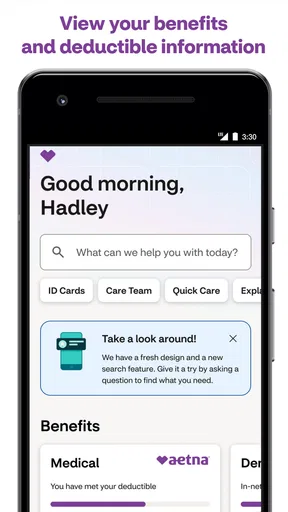
First things first, the app interface is super user-friendly. Navigating through the app is a breeze thanks to its clean design and intuitive layout. You’ve got everything neatly organized, which means less time scrolling and more time actually getting stuff done.
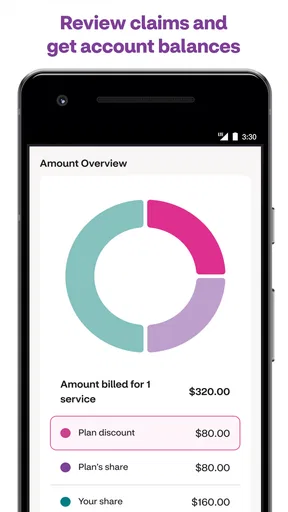
One feature I found particularly handy is the ability to track claims. You can see all your recent claims, whether they’re pending or processed, and get detailed breakdowns. This transparency is a game-changer, especially when you’re trying to keep an eye on your expenses.
Membership Card and More
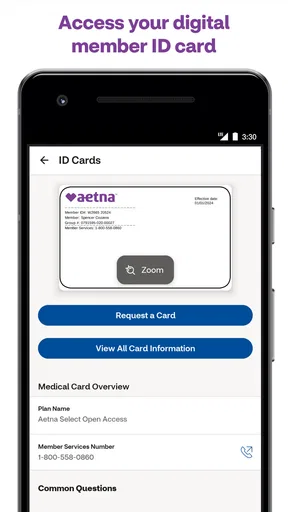
Ever been at the doctor’s office and realized you left your insurance card at home? No worries! With the app, your membership card is digital, and it’s always with you. Just a few taps, and you can pull up your card info right from the app. It’s a lifesaver.
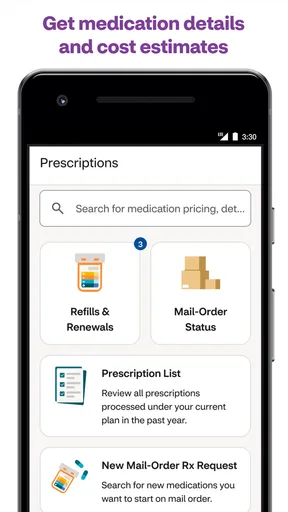
Another neat feature is the way it helps you manage your prescriptions. You can set reminders for when it’s time to refill your meds, and even find nearby pharmacies. It’s these small conveniences that really make a big difference in our busy lives.
Personalized Health Tools
Now, let’s talk about the personalized health tools. The app offers personalized insights and tips based on your health data. It feels like having a mini health coach that keeps you informed and motivated. Plus, you can sync it with other health apps and devices, which is a huge plus for tech-savvy users.
Speaking of personalization, the app also lets you customize your dashboard. You can choose which features you want quick access to, which makes the app feel like it’s truly tailored to your needs.
Real-Time Support
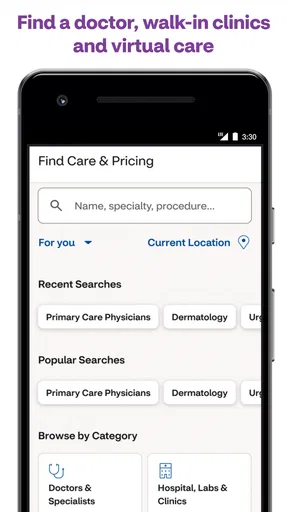
And if you ever find yourself in a pinch, the app offers real-time support. Whether you have questions about your coverage or need help finding a doctor, the support feature connects you with a representative who can assist you. This quick access to help can be a real stress-reliever.
Final Thoughts
Overall, the app is a comprehensive tool that makes managing your health and insurance a whole lot easier. From tracking claims to setting medication reminders, it’s packed with features that cater to both the tech-savvy and the more traditional users. If you’re part of the Aetna family, this app is definitely worth a download. It’s like having peace of mind at your fingertips.
Privacy and Permissions
See what permissions an app requests and how it handles your data.
- Location
- approximate location (network-based)
- Camera
- take pictures and videos
- Other
- view network connections, control flashlight, full network access, run at startup, reorder running apps, prevent device from sleeping
Verdict
Strengths of Aetna Health
- User-friendly interface simplifies navigation.
- Comprehensive health tracking features.
- Easy access to medical records and claims.
- Secure messaging with healthcare providers.
- Customizable wellness goals and reminders.
Limitations of Aetna Health
- Limited features for non-Aetna members.
- Occasional login issues reported.
- Some features require stable internet.
- May overwhelm users with notifications.
- Not all providers available for messaging.
Other Releases by Aetna Inc
View All
Aetna Better Health - Medicaid
Medical3.2
Similar Picks in This Category
View All
WebMD: Symptom Checker
WebMD, LLC4.1

Microphone Amplifier
DOSA Apps4.2

Anatomy Learning - 3D Anatomy
3D Medical OU4.5

Period Tracker and Calendar
SimpleInnovation4.9

GoodRx: Prescription Coupons
GoodRx4.8

CVS Health
CVS Pharmacy4.5
Frequently Asked Questions
What features does the Aetna Health app offer?
The Aetna Health app provides a range of features designed to help you manage your health more effectively. These include access to your insurance plan details, a personalized dashboard, cost estimates for medical services, appointment scheduling, and secure messaging with healthcare providers. You can also find in-network doctors and facilities easily.
Is the Aetna Health app free to download and use?
Yes, the Aetna Health app is free to download for both Android and iOS devices. However, to access its features, you must be an Aetna member with an active insurance plan. Some specific features may depend on your plan type, so check your plan details for more information.
How secure is my personal information on the Aetna Health app?
Aetna Health takes user privacy and data security very seriously. The app uses advanced encryption and security measures to protect your personal and health information. Additionally, you can enable biometric authentication, such as fingerprint or facial recognition, for added security when accessing the app.
Can I use the Aetna Health app to manage prescriptions?
Yes, the Aetna Health app allows you to manage your prescriptions efficiently. You can refill prescriptions, view current medications, and set up medication reminders. The app also offers a search feature to find nearby pharmacies and compare medication costs, making it easier to manage your prescriptions.
Are there any troubleshooting tips for common app issues?
If you encounter issues with the Aetna Health app, first ensure that you have the latest version installed. Check your internet connection and restart your device. If problems persist, you can contact Aetna customer support through the app for assistance. They can help resolve login issues, display errors, and other technical difficulties.
